Timesheet reports as PDF or Excel
In Klokka you download a timesheet report for any dates, as a PDF or Excel file. As the employer you get the whole business, and as an employee your own hours. Klokka is free to use, on the web and in the Android app, in Swedish and English.
See a sample report
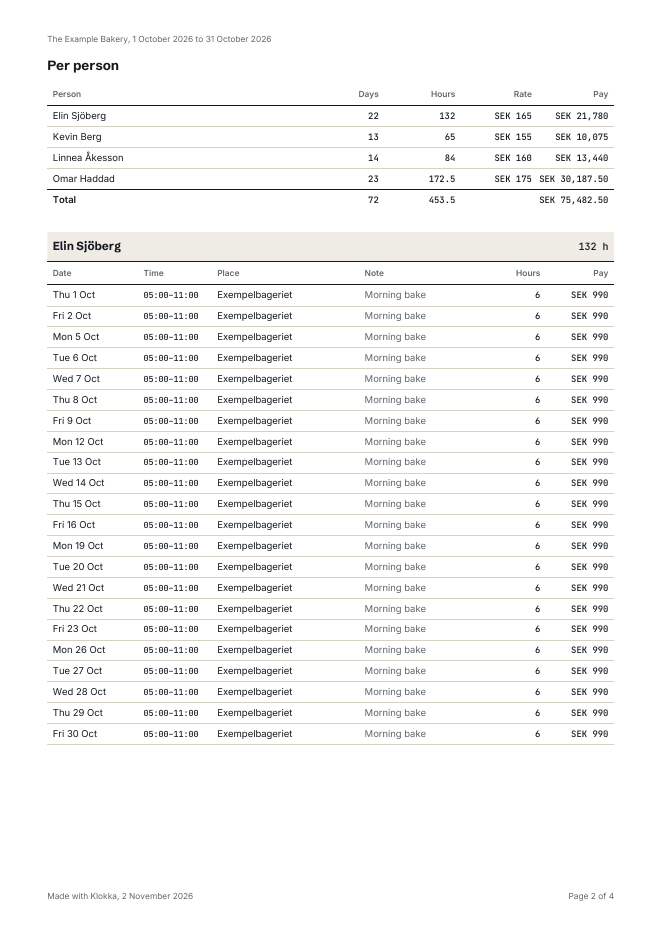
The sample shows October 2026 for an invented bakery with four staff.
The report is drawn by the same code as when you download one in Klokka.


The report, two clicks away
A quick pick or two dates of your own, then PDF or Excel.
What is in the report
The first page sums up the business, the period, the total hours and how many people are included. Then comes a table per person with each day and its hours. The table header repeats on every page and a row is never split across two pages, so the report prints cleanly.
Pay is included only when Show pay to employees is on and the person has an hourly rate. The amount then sits next to the hours, per day and for the period. Otherwise the report has hours only.
The Excel file holds the same numbers, one row per day, so you can sort, total and pass it on.
Pick the dates
Under Reports you pick the period with a quick pick (this week, last week, this month, last month, this year) or two dates of your own, up to a year at a time. Then PDF or Excel. On the phone the same choice opens as a sheet.
Who the report is for
- The accountant or whoever runs payroll: the whole month for everyone, as a PDF to read or an Excel file to work from.
- The employee: their own record to keep and to check the payslip against.
- When you disagree about a month: the same numbers on paper, for both of you.
- Every Monday there is also an email with last week's hours and an Excel file, unless you have turned it off.
Excel template or report?
With two employees on fixed hours, a timesheet template goes a long way. When hours change every week, the report saves you copying the same numbers out again: they are already in Klokka, entered day by day.
What the law asks for
Swedish employers must keep records of on-call time, overtime and additional hours (Working Hours Act, section 11), keeping apart, for example, general and extra overtime (AFS 2023:2, chapter 9, section 5). Klokka does not calculate overtime or split hours that way. The report gives the basis, hours per day and person, that whoever runs payroll works from. More in our guide to overtime and additional hours.